CONVERTING FROM BINARY TO OCTAL: EXPLANATION WITH ANALOGY
✔️CONVERTING FROM BINARY TO OCTAL: EXPLANATION WITH ANALOGY:
Imagine you’re a translator at a bustling international airport. Your job is to take a passenger who speaks one language (binary) and help them find their way to another destination (octal) by first translating their language into a common tongue (decimal). Let’s break down your code using this analogy.
The Scenario
-
The Passenger (Binary Input): A passenger arrives at the airport with a ticket written in a language that only uses two symbols: 0 and 1. This represents the binary number system.
-
The Translator (Your Code): You, as the translator, need to first understand what this passenger is saying (convert binary to decimal) before you can help them reach their final destination (convert decimal to octal).
Step-by-Step Breakdown
1. Gathering Information:
- Code:
int binaryInput; // To store user input as an integer - Analogy: You ask the passenger for their ticket. This is where you gather the binary number they provide.
2. Understanding the Ticket:
- Code:
cout << "Interpreted binary input (as integer): " << binaryInput << endl; - Analogy: You read the ticket aloud to confirm what the passenger has. This ensures you both understand the starting point.
3. Translating Binary to Decimal:
- Code:
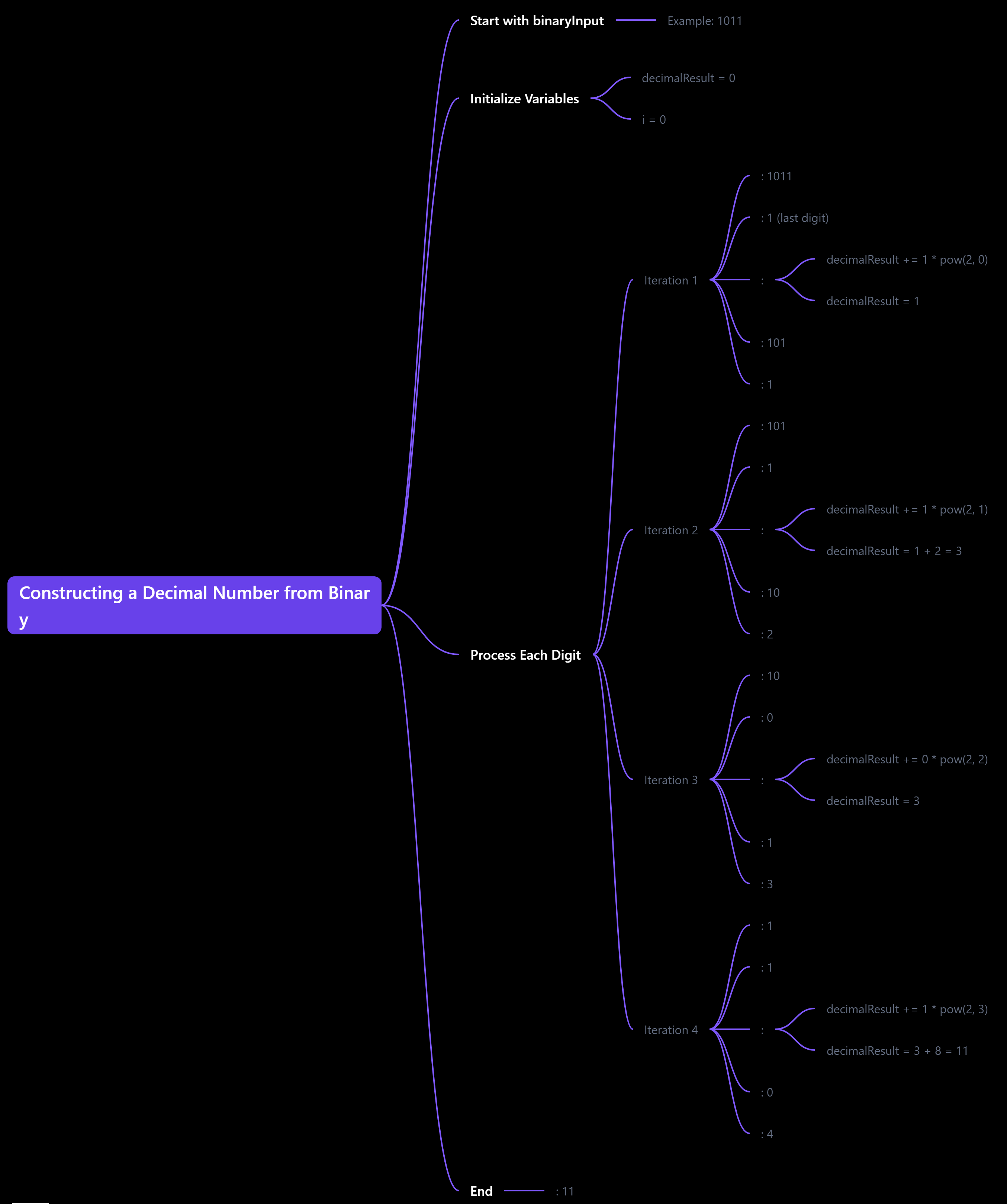
while (binaryInput != 0) { decimalResult += (binaryInput % 10) * pow(2, i); binaryInput /= 10; i++; } - Analogy: You break down the binary ticket into manageable parts. Each digit (0 or 1) represents a specific value based on its position (like how much a seat costs depending on its row). You multiply each digit by (2^i) where (i) is the position from the right (starting at 0). This is like saying, "If this is a 1 in the first position, it’s worth 1; if it’s in the second position, it’s worth 2; and so on."
4. Translating Decimal to Octal:
- Code:
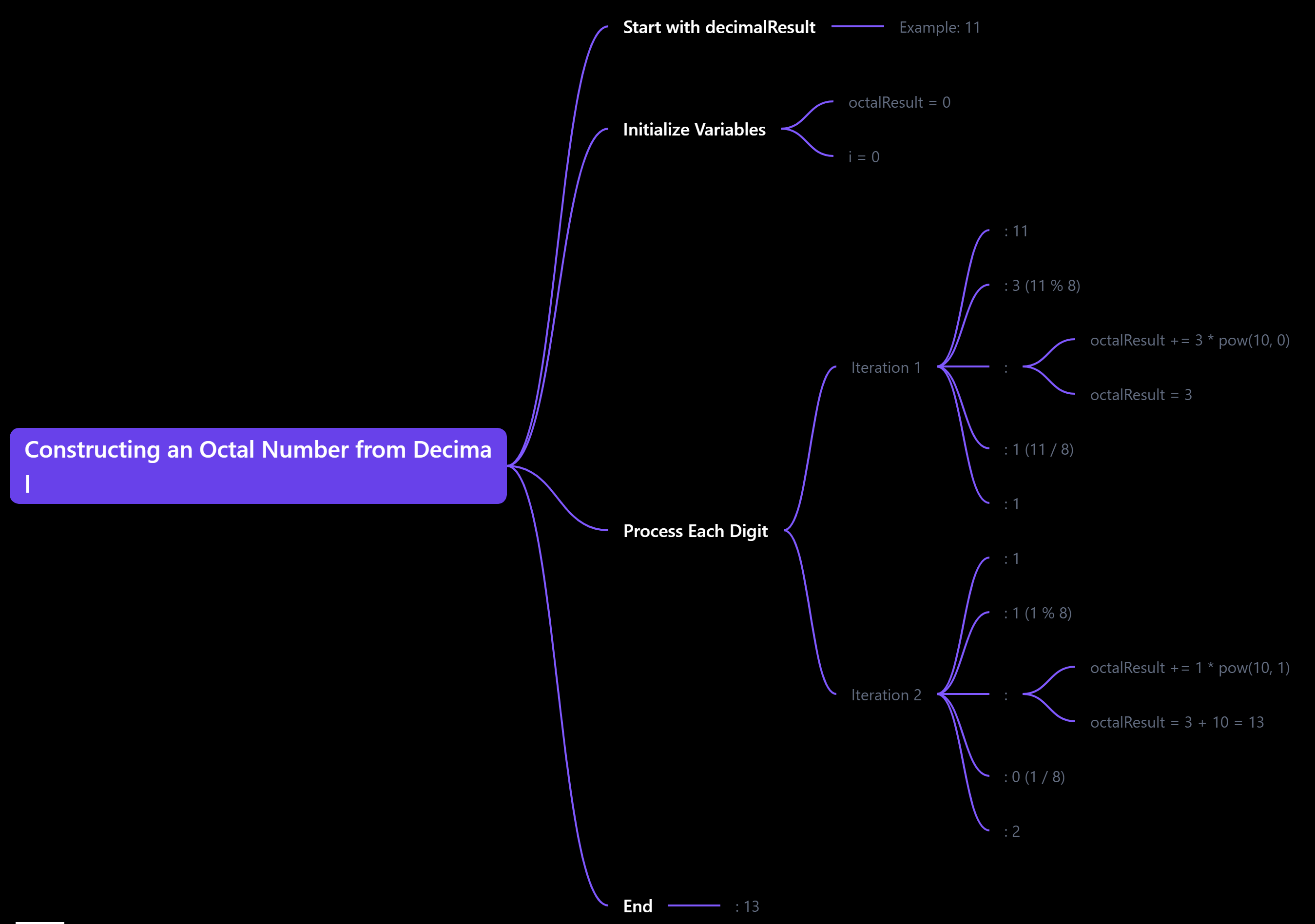
while (decimalResult != 0) { octalResult += (decimalResult % 8) * pow(10, i); decimalResult /= 8; i++; } - Analogy: Now that you have the decimal value, you need to convert it to octal. This is like converting the total cost of the ticket (in dollars) into a different currency (like euros). You divide the decimal number by 8 and keep track of the remainders. Each remainder corresponds to a digit in the octal system, much like how you would convert currency based on exchange rates.
5. Final Output:
- Code:
cout << "The octal number is: " << octalResult << endl; - Analogy: After all the translations, you present the passenger with their final ticket in the octal language. They can now understand where they need to go next!
Conclusion
Through this analogy, you can see how your code translates a binary number into decimal and then into octal, just like a translator helps a passenger navigate through different languages. Each step is crucial to ensure that the final destination is reached accurately.
ALSO, I HAVE ATTACHED TWO IMAGES TO UNDERSTAND THE MINDMAP BEHIND THESE TWO CONVERSIONS-